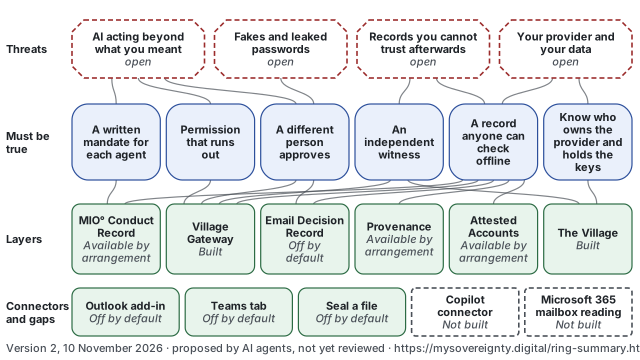
Summary diagram: threats, needs and answers
The threat, function and solution map on one page, for a board: the kinds of threat, what must be true to be protected, and the layers that answer it, with how far each is built.
Version 2, 10 November 2026 · proposed by AI agents, not yet reviewed
The diagram
On a small screen the drawing is too small to read. The diagram in words, below, says the same.
Threat family (cut corners) · What must be true (rounded ends) · Layer, with its status in words: Built, Available by arrangement, Off by default · Dashed outline: open, or not built
Lines run only between neighbouring bands, top to bottom. A line's thickness and the number on it say how many links on the full map join the two boxes (from 1 to 4); a thicker line means more claims on the full map, not stronger protection; a layer's count includes the parts folded into it. The full map also joins layers straight to threats and adds the evidence for each layer; those are not drawn here.
Every threat family is drawn open: each holds threats that are only partly answered or have no answer on the map. Nothing here is marked as fully answered: that judgement is the operator's.
Summary diagram: threats, needs and answers · Version 2, 10 November 2026 · proposed by AI agents, not yet reviewed · The current version: https://mysovereignty.digital/ring-summary.html · The full map: https://mysovereignty.digital/ring-map.html
The diagram in words
The same 21 boxes and 20 lines as the drawing, band by band. Each line is listed under both of its ends, with its count of links on the full map.
-
Threat families (4)
-
AI acting beyond what you meant
Threat family Open: 3 partly answered, 1 with no answer on the map
Its threats in the full map: AI agents that overstep (partly answered); An email sent by an agent nobody approved (partly answered); Confident AI mistakes (partly answered); Unfair automated decisions (no answer on this map).
Answered in part by: A written mandate for each agent (1 link), Permission that runs out (1 link), A different person approves (3 links).
-
Fakes and leaked passwords
Threat family Open: 1 partly answered, 2 with no answer on the map
Its threats in the full map: Messages that sound like someone you know (partly answered); Leaked passwords and member details (no answer on this map); Pictures you cannot vouch for (no answer on this map).
Answered in part by: A different person approves (1 link).
-
Records you cannot trust afterwards
Threat family Open: 2 partly answered
Its threats in the full map: A record changed after the event (partly answered); Your provider is also the only witness (partly answered).
Answered in part by: An independent witness (2 links), A record anyone can check offline (1 link).
-
Your provider and your data
Threat family Open: 3 partly answered
Its threats in the full map: Foreign law (partly answered); A provider you cannot leave (partly answered); Locks that will not hold forever (partly answered).
Answered in part by: A record anyone can check offline (1 link), Know who owns the provider and holds the keys (3 links).
-
-
What must be true (6)
-
A written mandate for each agent
What must be true
Each AI agent has a written statement of what it may do, kept where it can be shown later. This claim in the full map.
Answers part of: AI acting beyond what you meant (1 link).
A written mandate for each agent is served in part by: MIO° Conduct Record (1 link).
-
Permission that runs out
What must be true
Permission to act covers one action for a short time, so a stolen or replayed permission is of little use. This claim in the full map.
Answers part of: AI acting beyond what you meant (1 link).
Permission that runs out is served in part by: Village Gateway (1 link).
-
A different person approves
What must be true
An action with real consequences waits for a person other than the one, or the agent, that asked for it. This claim in the full map.
Answers part of: AI acting beyond what you meant (3 links), Fakes and leaked passwords (1 link).
A different person approves is served in part by: Village Gateway (2 links), Email Decision Record (1 link).
-
An independent witness
What must be true
Someone other than the provider keeps a signed, dated record of what was done, by whom and with whose approval. This claim in the full map.
Answers part of: Records you cannot trust afterwards (2 links).
An independent witness is served in part by: Village Gateway (1 link), The Village (1 link).
-
A record anyone can check offline
What must be true
A record can be checked by whoever holds it, without an account and without asking the provider. This claim in the full map.
Answers part of: Records you cannot trust afterwards (1 link), Your provider and your data (1 link).
A record anyone can check offline is served in part by: MIO° Conduct Record (1 link), Village Gateway (1 link), Email Decision Record (4 links), Provenance (1 link), Attested Accounts (1 link).
-
Know who owns the provider and holds the keys
What must be true
Before relying on a provider, an organisation knows who owns it, which laws reach it and who holds the keys. This claim in the full map.
Answers part of: Your provider and your data (3 links).
Know who owns the provider and holds the keys is served in part by: The Village (2 links).
-
-
Layers that answer it (6)
-
MIO° Conduct Record
Layer Status: Available by arrangement (register CON-01)
This layer in the full map. Folded in from the full map: Checking an action against the mandate in force (off by default).
Serves in part: A written mandate for each agent (1 link), A record anyone can check offline (1 link).
-
Village Gateway
Layer Status: Built (register GTW-01)
This layer in the full map. Folded in from the full map: The requester cannot approve its own request; Permits run out; Stop every Gateway decision at once; A spending limit for each agent; An outside clock on each Gateway receipt.
Serves in part: Permission that runs out (1 link), A different person approves (2 links), An independent witness (1 link), A record anyone can check offline (1 link).
Not built for it: Copilot connector.
-
Email Decision Record
Layer Status: Off by default (register EDR-03)
This layer in the full map. Folded in from the full map: Four eyes on an agent's email; Sending through a Microsoft account with send-only permission; Outlook add-in: seal a message and link its reply; Teams tab: seal a copy of pasted text; Seal a file: a document version sealed by its digest.
Serves in part: A different person approves (1 link), A record anyone can check offline (4 links).
Connectors drawn by name: Outlook add-in (off by default); Teams tab (off by default); Seal a file (off by default).
Not built for it: Microsoft 365 mailbox reading.
-
Provenance
Layer Status: Available by arrangement (register PRV-02)
This layer in the full map. Nothing is folded in: the full map shows it as one claim.
Serves in part: A record anyone can check offline (1 link).
-
Attested Accounts
Layer Status: Available by arrangement (register ACC-01)
This layer in the full map. Nothing is folded in: the full map shows it as one claim.
Serves in part: A record anyone can check offline (1 link).
-
The Village
Layer Status: Built (register VIL-01)
This layer in the full map. Folded in from the full map: Hash-linked records; Signing keys on a separate host, held by MDSL; A second, post-quantum signature; Held in New Zealand or the EU, by providers that are not US-owned; Export a Village's shared records.
Serves in part: An independent witness (1 link), Know who owns the provider and holds the keys (2 links).
-
-
Connectors (3)
-
Outlook add-in
Connector Status: Off by default
Outlook add-in: seal a message and link its reply, part of Email Decision Record. This claim in the full map, with its source, test and audit note. No line of its own: its links count toward Email Decision Record.
-
Teams tab
Connector Status: Off by default
Teams tab: seal a copy of pasted text, part of Email Decision Record. This claim in the full map, with its source, test and audit note. No line of its own: its links count toward Email Decision Record.
-
Seal a file
Connector Status: Off by default
Seal a file: a document version sealed by its digest, part of Email Decision Record. This claim in the full map, with its source, test and audit note. No line of its own: its links count toward Email Decision Record.
-
-
Not built (2)
-
Copilot connector
Not built
A Copilot connector to Village Gateway, part of Village Gateway. This gap in the full map. No line: it has no source, so it counts toward nothing.
-
Microsoft 365 mailbox reading
Not built
Reading a Microsoft 365 mailbox through Microsoft sign-in, part of Email Decision Record. This gap in the full map. No line: it has no source, so it counts toward nothing.
-
How it is made
A program draws this page from the full map's data file whenever the map changes, so both are built from the same claims. It groups the 12 threats into families, folds each layer's parts into the layer, and counts the links between neighbouring bands. A link to something not built has no source and is not counted. Each layer keeps the status the full map gives it.
The map was drafted by AI agents from our pages, our claims register and the platform's code, and so was this summary. Until a person at My Digital Sovereignty Ltd has reviewed them, both are marked proposed by AI agents, not yet reviewed.
A small version of the drawing, for a document or a slide: ring-summary-small.svg (640 by 360).